



Closed beta · invite-only access

Six AI tools.
One app.

Footage sorting, captions, AI images, thumbnails and viral cut. All inside RAWCUT — no more juggling five subscriptions.

Calculate your savings
Local processing
Your files never leave your machine
DaVinci handoff
Native Resolve XML · round-trip ready
Made for Mac
Windows coming soon
RAWCUT replaces
Submagic Captions.ai Midjourney Canva Pro Copy.ai Jasper Topaz Video AI Opus Clip CapCut Pro Descript Veed ChatGPT Plus Submagic Captions.ai Midjourney Canva Pro Copy.ai Jasper Topaz Video AI Opus Clip CapCut Pro Descript Veed ChatGPT Plus
Features

Everything between the camera and the timeline.

A focused toolkit that replaces the painful parts of post-production — so you spend your time creating, not cleaning up.

AI footage sorting

Drop unnamed clips straight from your SD card. AI labels, dates and organizes every file into clean project folders.

Core Replaces: Topaz + manual sorting · ~$30/mo

Auto captions

Whisper-powered transcription tuned for 50+ languages. 4 caption styles, word-by-word animation. Burn in or export SRT.

Core Replaces: Submagic, Captions.ai · ~$24/mo

Image generator

Create AI images right in your project — intros, transitions, illustrations. Consistent style across an entire series.

Core Replaces: Midjourney, Leonardo · ~$30/mo

Thumbnail Maker

AI-generated thumbnails with 4 variants. Presets for YouTube, Instagram Reels, TikTok and Shorts.

Core Replaces: Canva Pro, Thumbnail.ai · ~$15/mo

Viral engine

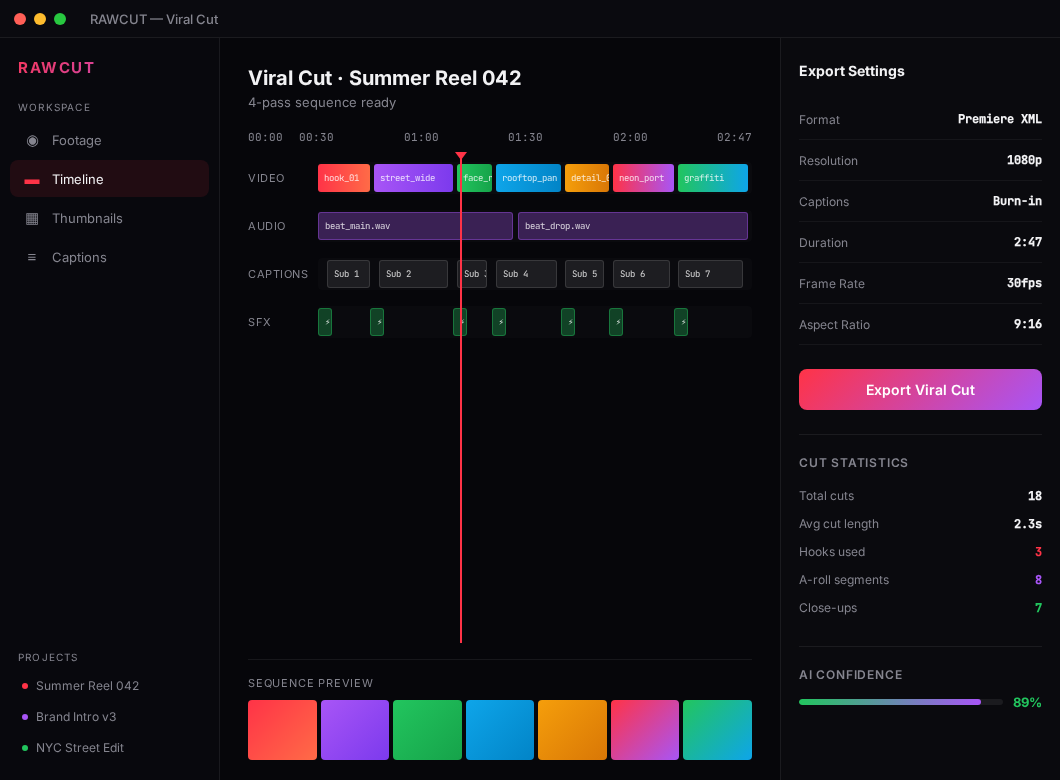
4-pass AI — transcript → visual → story → review. Assembles complete sequences ready to publish. Exports to MP4 and DaVinci Resolve XML. Premiere coming soon.

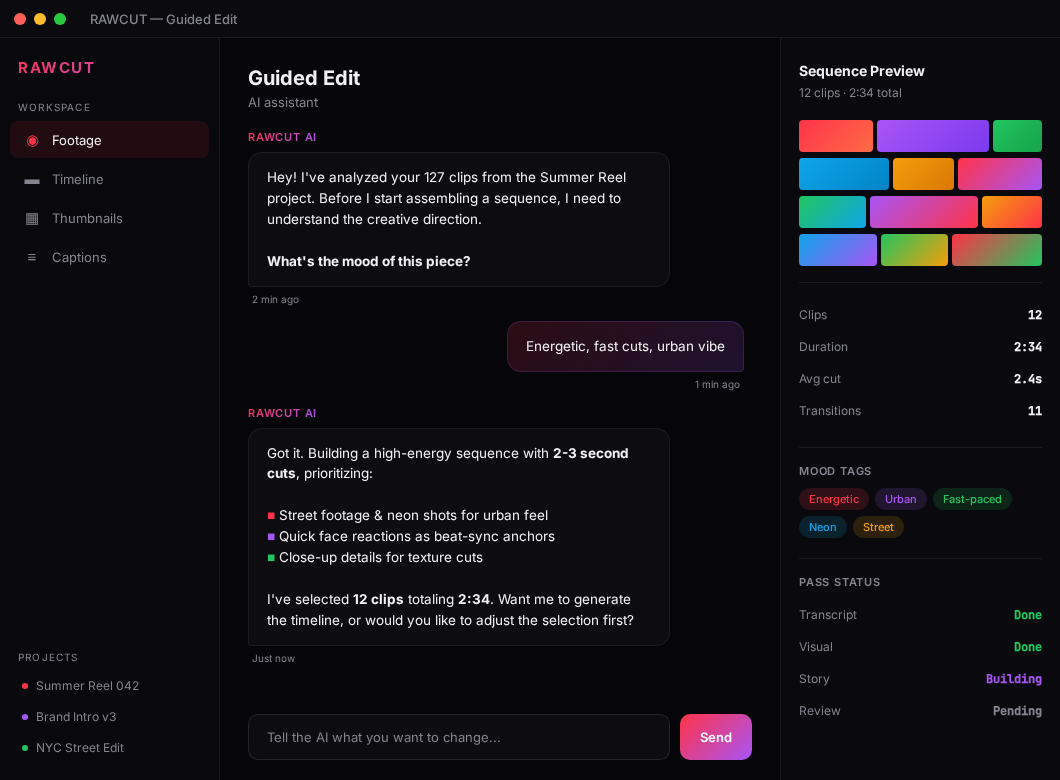
  • Assisted edit: AI asks 5 sharp questions about your vision and builds a sequence to match.
  • Chat editor: talk to the timeline — "shorten the hook, cut B-roll at 0:42".

Beta · access on request Replaces: Opus Clip, CapCut Pro · ~$25/mo
Soon
✉️

Email Maker

Generate a newsletter straight from your video — summary, key moments, CTA.

Soon
Soon
⚙️

Automation Engine

Map your full workflow — from ingest to publish — and let it run on autopilot.

Soon
Soon
🔁

AI Repurposing

Turn 1 long video into 10 versions — Reels, Shorts, TikTok, podcast clip, blog post.

Soon
Soon
📱

Social Distribution

Publish everywhere at once — YouTube, Instagram, TikTok, X, LinkedIn — from a single place.

Soon
How it works

Three steps from chaos to timeline.

Stop staring at a folder full of IMG_0342.MOV files. RAWCUT takes your raw material and hands you back a finished sequence ready to export.

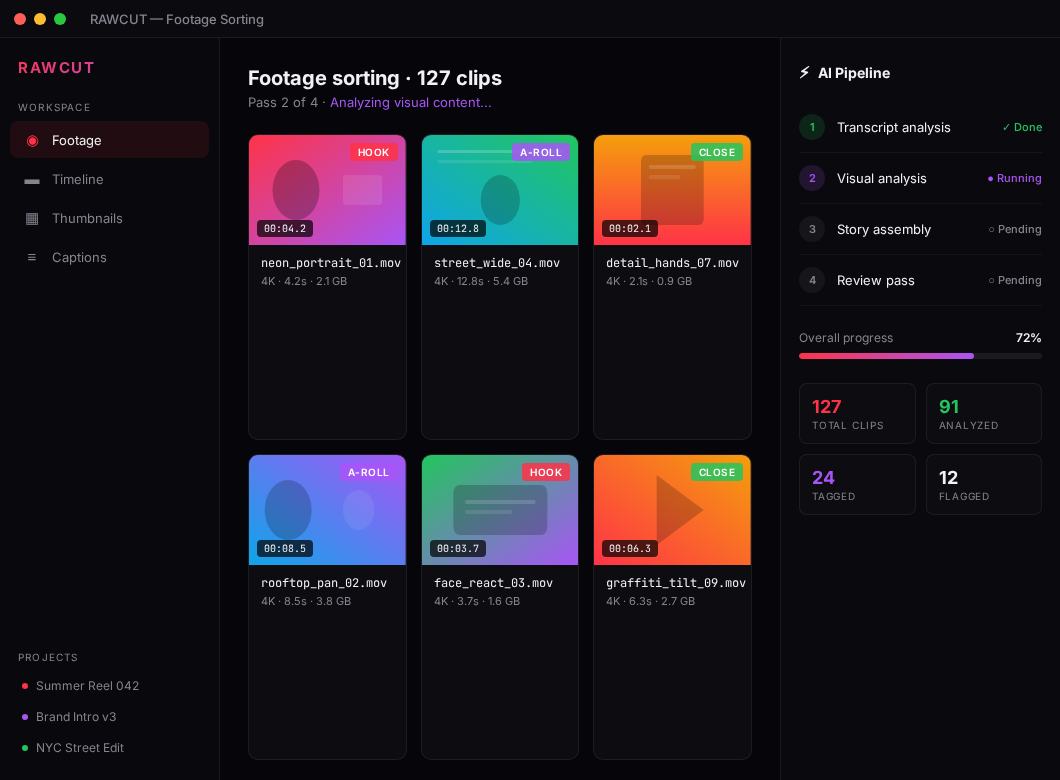
RAWCUT dashboard showing imported footage
01

Drop your footage

Pick a folder of raw clips. Mixed formats, nested folders, unnamed files — RAWCUT doesn't care.

RAWCUT guided edit panel with AI analysis
02

AI does the work

A 4-pass system analyzes the footage, writes the story, builds the cut and reviews pacing and flow.

RAWCUT viral cut export view
03

Export and publish

One click. A complete sequence with captions and thumbnails — exported to MP4 or DaVinci Resolve XML, ready to ship.

Built for the daily grind

Built by creators, for creators.

RAWCUT is used every day inside IDEA DIVISIONS — a working digital agency. Every feature exists because a real editor needed it at 2 AM before a deadline.

RAWCUT — Project: SUMMER_REEL_042

Footage sorting · 127 clips

Pass 2 of 4 · Visual content analysis...

HOOK0:06neon_portrait_01.mov
0:14ocean_wide_b_roll.mov
A-ROLL1:22interview_studio.mov
0:09desk_closeup.mov
0:18logo_reveal.mov
CLOSE0:11city_night_drone.mov

Your stack

See how much you pay for tools that RAWCUT replaces.

Click the tools you currently use. We'll show your monthly and yearly stack cost — and how much of it RAWCUT absorbs into a single app.

Pick at least one tool.
You'll see your current monthly spend — and how much of it RAWCUT absorbs.
Local-first
Your files never leave your machine
GDPR · EU
Operated by Slovak company
Slovak-first
Whisper tuned for Slovak (and 50+ langs)
Powered by
Whisper · fal.ai · Anthropic · DaVinci
Creators in closed beta — YouTube, podcasts, agencies. Join them.
Pricing

Pricing will be revealed at public launch.

Beta access is free. We're finalizing pricing tiers together with our first closed beta users.

Beta access is free.

No subscription, no payment. Send us an email and if we pick you, you'll get an invite code within 7 days.

FAQ

What creators ask before joining the beta.

If your question isn't here, email hello@rawcut.sk.

How does the closed beta work?
After signup, you'll get an invite code within 24 hours. The beta is free — no credit card, no commitment. Pricing reveals at public launch.
Does it work on Windows?
Stage 1 launch is macOS only (Apple Silicon and Intel). Windows is in development. Register your email and we'll notify you when it's ready.
Do my files go to the cloud?
Video processing runs locally on your machine. AI calls (transcription, image generation) hit our encrypted API, but the video files themselves never leave your Mac. Local-first by design.
Which video formats does it support?
MP4, MOV, MKV, AVI — including H.264, H.265 and ProRes. Sony FX3, GoPro, Canon, iPhone — all supported. Automatic multi-camera setup detection.
Does it work with DaVinci Resolve or Premiere?
DaVinci Resolve integration is native — RAWCUT pushes the finished timeline straight into Resolve with markers and cuts intact. Premiere XML export is coming soon.
Is it good for podcasts or only vlogs?
Both. Sorter and Captions are equally useful for video podcasts, online courses, infopreneurs, agency work, and classic YouTube vlogs.
What will pricing look like?
We're planning 4 tiers: Free (Sorter only), Starter, Pro, and Studio. Exact prices reveal at public launch. The beta is free and beta users get preferential terms.
Who's behind RAWCUT?
RAWCUT is built by a Slovak team. Native Slovak support, EU-compliant invoicing, support via hello@rawcut.sk. Press kit and team info.

Stop sorting. Start creating.

Be among the first creators in the closed beta.